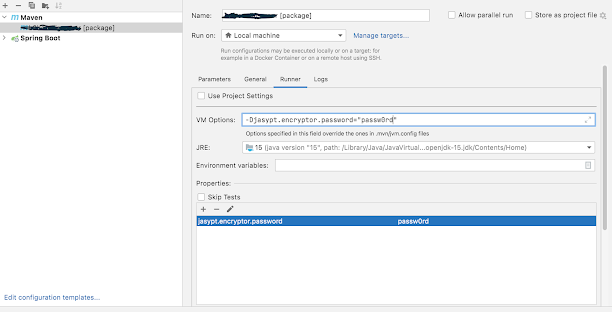
Intellij spring boot build failing not seeing the jasypt password. The same is working fine with the normal startup and is also working with mvn command. Caused by: org.springframework.boot.context.properties.ConfigurationPropertiesBindException: Error creating bean with name 'spring.security-org.springframework.boot.autoconfigure.security.SecurityProperties': Could not bind properties to 'SecurityProperties' : prefix=spring.security, ignoreInvalidFields=false, ignoreUnknownFields=true; nested exception is org.springframework.boot.context.properties.bind.BindException: Failed to bind properties under 'spring.security.user.password' to java.lang.String Caused by: org.springframework.boot.context.properties.bind.BindException: Failed to bind properties under 'spring.security.user.password' to java.lang.String Caused by: org.springframework.cache.Cache$ValueRetrievalException: Value for key 'spring.security.user.password' could not be load...
Preface --------- I had a free raspberry pi's version B lying around and a spare PS3 eye and a few hours in hand { which later extended to days and week :) }. Decided to use Javacv for a quick IP-Cam setup and a simple face recognition(Dint get time to work till now). Thanks a lot for Samuel Audet for helping out with a lot of issues. https://groups.google.com/forum/#!topic/javacv/Ql1v5THKIcQ Going through the above link you can read all my interactions with Samuel. This is gonna be a pretty lengthy post. Read through if you need to compile a later version if not simply skip to interesting parts and links. Events --------- Step 1 Look for existing tutorial and I did found one,very well explained with steps http://salaboy.com/2013/06/14/using-javacv-in-the-raspberry-pi-linux-arm/ Went through the steps, installed the opencv version 2.4. Opencv installation success (!yaay!) . Developer in me decided I will take a latest version of javac...
This occurs during the quartz - spring-batch integration when we are trying to pass in the JobLauncher object into the quartz class that extens the quartz bean. this can be overcome like below <bean id="fetchTransaction_quartz" class="org.springframework.scheduling.quartz.JobDetailFactoryBean"> <property name="jobClass" value="com.incomm.chase.settlement.quartz.FetchTransaction"> </property> <property name="jobDataAsMap"> <map> entry key="timeout" value="5"/> <entry key="jobName" value="chaseSettlement"></entry> <!--the entries added here will cause a serialization exception --> <!-- <entry key="jobLocator" value-ref="jobRegistry"/> <entry key="jobLauncher" value-ref="jobLauncher"/> --> </map> </pro...
Comments
Post a Comment