If the Web Logic Portal Admin Console doesn't log in after typing the URL.If it just remains in the same page ..try using the HTTPS URL.Get the port from server configuration and make it login.
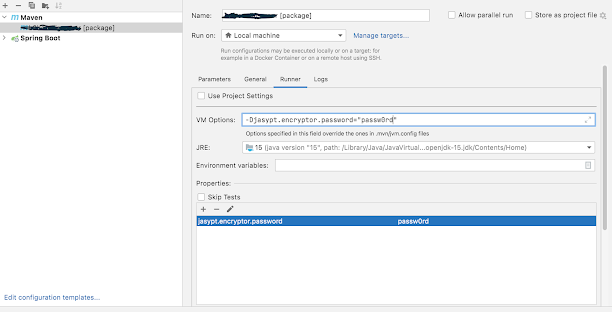
Intellij spring boot build failing not seeing the jasypt password. The same is working fine with the normal startup and is also working with mvn command. Caused by: org.springframework.boot.context.properties.ConfigurationPropertiesBindException: Error creating bean with name 'spring.security-org.springframework.boot.autoconfigure.security.SecurityProperties': Could not bind properties to 'SecurityProperties' : prefix=spring.security, ignoreInvalidFields=false, ignoreUnknownFields=true; nested exception is org.springframework.boot.context.properties.bind.BindException: Failed to bind properties under 'spring.security.user.password' to java.lang.String Caused by: org.springframework.boot.context.properties.bind.BindException: Failed to bind properties under 'spring.security.user.password' to java.lang.String Caused by: org.springframework.cache.Cache$ValueRetrievalException: Value for key 'spring.security.user.password' could not be load...
Preface --------- I had a free raspberry pi's version B lying around and a spare PS3 eye and a few hours in hand { which later extended to days and week :) }. Decided to use Javacv for a quick IP-Cam setup and a simple face recognition(Dint get time to work till now). Thanks a lot for Samuel Audet for helping out with a lot of issues. https://groups.google.com/forum/#!topic/javacv/Ql1v5THKIcQ Going through the above link you can read all my interactions with Samuel. This is gonna be a pretty lengthy post. Read through if you need to compile a later version if not simply skip to interesting parts and links. Events --------- Step 1 Look for existing tutorial and I did found one,very well explained with steps http://salaboy.com/2013/06/14/using-javacv-in-the-raspberry-pi-linux-arm/ Went through the steps, installed the opencv version 2.4. Opencv installation success (!yaay!) . Developer in me decided I will take a latest version of javac...
This occurs during the quartz - spring-batch integration when we are trying to pass in the JobLauncher object into the quartz class that extens the quartz bean. this can be overcome like below <bean id="fetchTransaction_quartz" class="org.springframework.scheduling.quartz.JobDetailFactoryBean"> <property name="jobClass" value="com.incomm.chase.settlement.quartz.FetchTransaction"> </property> <property name="jobDataAsMap"> <map> entry key="timeout" value="5"/> <entry key="jobName" value="chaseSettlement"></entry> <!--the entries added here will cause a serialization exception --> <!-- <entry key="jobLocator" value-ref="jobRegistry"/> <entry key="jobLauncher" value-ref="jobLauncher"/> --> </map> </pro...
Comments
Post a Comment